Why the feature lists all match
Every plugin in this category syncs products to Paddle, opens a Paddle checkout, and listens for a webhook. That is the shape of the integration, so of course the bullet points converge. A feature list tells you what a plugin attempts. It tells you nothing about what happens when Paddle answers slowly, when a webhook is missed, or when a refund needs manual approval.
The official Stripe and PayPal extensions for WooCommerce sit at roughly three stars, and if you read the reviews the complaints are almost never about missing features. They are about stuck orders, invisible webhooks, and settings that changed on their own. That is the real risk surface for a payment gateway, and it is what the questions below are aimed at.
Billing API or Classic API
Paddle has two generations of API. Paddle Classic is the older one and has been closed to new sellers since 2023. Paddle Billing is the current platform, and it is what a new Paddle account gives you.
Some plugins still carry Classic support, either alongside Billing or instead of it. If you are signing up for Paddle today, a Classic code path is dead weight at best — and if a plugin only speaks Classic, it cannot work with your account at all. Check which one a plugin targets before anything else, because it decides whether the rest of the evaluation matters.
Refunds, and the part that is hard
Refunds look like a checkbox on a feature list. They are not, because of one detail in how Paddle works: above a certain amount, or on an account Paddle has not finished verifying, a refund is not granted immediately. It is submitted for review and sits in a pending state until a human at Paddle approves or rejects it.
WooCommerce has no concept of a refund that might not happen. Press the refund button and it writes a refund record, adjusts the order total, and tells the customer the money is on its way. If a plugin reports success the moment Paddle accepts the request, your store now shows a refund for money that has not moved and may never move.
So the question to ask is not "does it support refunds". It is: what does your store show while a refund is awaiting Paddle's approval? The honest answer involves a pending state, a record that no money has moved yet, and something that reconciles the outcome later when Paddle decides.
The matching question is what happens when a refund is issued from the Paddle dashboard rather than from WooCommerce. Someone on your team will eventually do that. If nothing syncs back, your order data quietly stops matching your payment provider.
Cart & Checkout Blocks
WooCommerce's block-based cart and checkout are the default for new stores. A gateway has to be registered as a Blocks payment method to appear there at all — the classic checkout integration does not carry over.
There is a second, smaller thing worth checking: whether the plugin declares Blocks compatibility. Without that declaration WooCommerce shows an incompatibility warning in the checkout editor even when the gateway works perfectly. Merchants reasonably read that warning as "this is broken".
Knowing your webhooks work
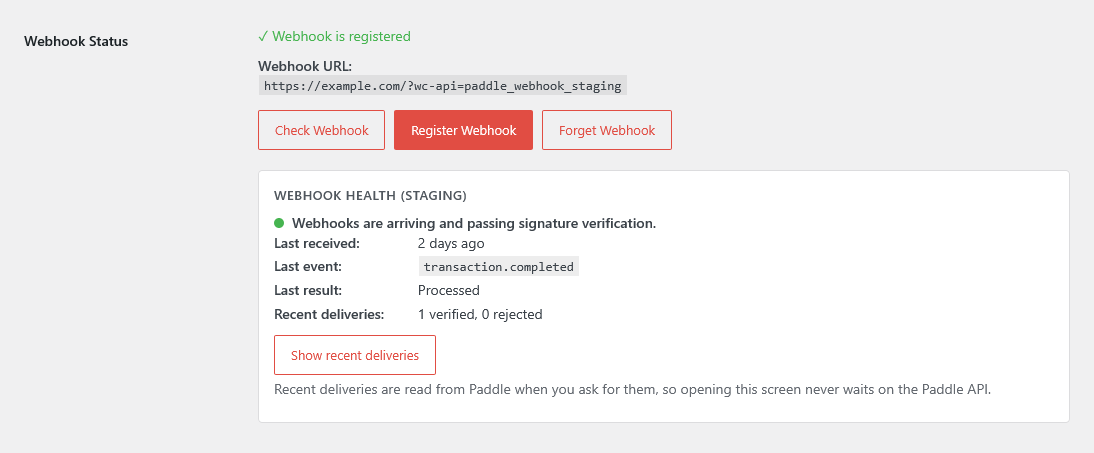
Webhooks are how a payment becomes a completed order. When they stop arriving, orders sit in pending, customers email you about a payment they have already made, and nothing in wp-admin says why. "Are my webhooks working?" is the single most common support question across every payment gateway plugin, not just Paddle ones.
Almost every plugin will register a webhook for you. Far fewer will tell you, later, whether it is still receiving anything. Look for a status indicator you can check without leaving WordPress, a log of recent deliveries, and the ability to replay one that failed. Also ask what happens to a webhook whose signature does not verify — the safe behaviour is to reject it, not to process it anyway.
What happens when a price changes
Your prices live in WooCommerce, but the amount the customer is actually charged lives in Paddle. Those are two copies of the same number, and copies drift. Change a price in WooCommerce and, until something pushes it, your catalogue and your checkout disagree — with the checkout winning.
Ask how and when a plugin pushes price changes, whether it does so automatically or only when you click sync, and whether it can run on a schedule for a catalogue too large to click through. Then ask the more awkward version: if a sync fails halfway, how do you find out?
What you keep if you leave
This one is easy to skip and expensive to get wrong. A WooCommerce gateway creates real WooCommerce orders, real customer records, and real line items in your own database. Your reporting, your affiliate plugin, your analytics events, your abandoned-cart tooling and your exports all keep working, because they are reading your store.
Hosted checkout platforms that replace WooCommerce rather than plug into it do not give you that. If you later change provider, you are migrating a business, not switching a plugin. Staying inside WooCommerce is the quiet advantage of this whole category, and it is worth confirming a plugin genuinely works that way rather than redirecting customers into someone else's storefront.
What PimiPay does today
Rather than claim everything, here is the current state, including the gaps. This reflects the plugin as shipped today, not a roadmap.
| Capability | Where it stands |
|---|---|
| Supported: Paddle Billing API | Billing only. No Classic API code path to maintain or migrate off. |
| Supported: Product and price sync | Simple and variable products, one Paddle price per variation. Sync one product from its row, many at once with a bulk action, or everything tagged on a schedule. |
| Supported: Tax categories | Set which of Paddle’s tax categories a product is sold under, per product or store-wide, so Paddle collects the right rate rather than treating everything as software. |
| Supported: Classic checkout | The shortcode checkout, still what most stores run. |
| Supported: Cart & Checkout Blocks | Registered as a Blocks payment method and declared compatible, so the editor does not flag it. |
| Supported: Overlay and inline checkout | Paddle overlay by default; inline embeds the payment form in your page, falling back to the overlay if the container is missing. |
| Supported: Coupons, fees and dynamic prices | Turn on Order total pricing and Paddle bills the total WooCommerce worked out, coupons, fees and per-customer prices included. Catalog price is the default, and in that mode a cart with a coupon hides the gateway rather than charging the wrong amount. |
| Supported: Checkout appearance and language | Light or dark Paddle checkout, and the option to follow the store’s language rather than the customer’s browser — which is what a WPML or Polylang store actually wants. |
| Supported: Refunds from the WooCommerce admin | Full and per-line-item partial refunds, including Paddle’s asynchronous approval state. |
| Supported: Refunds made in Paddle | Refunds started in the Paddle dashboard sync back into the WooCommerce order. |
| Supported: Webhook health and replay | A status panel in settings, a delivery log, and replay for a delivery that failed. |
| Supported: Self-diagnosis | Six Site Health checks for the failures that are otherwise silent — credentials, webhook registration, deliveries that arrive but never verify, the sync schedule — plus a Paddle section in WooCommerce → Status with no secrets in it, so it is safe to paste into a support email. |
| Supported: Sync failures that explain themselves | A failed sync says why, on the product and in the admin, rather than leaving the reason in a log file. A scheduled sync that starts failing is surfaced instead of failing quietly. |
| Supported: API key expiry alerts | Paddle API keys expire and cannot be renewed. With the webhook registered, the plugin emails you seven days before a key expires, again the moment Paddle rejects it, and once more when a new key works, so checkout does not go quiet overnight. |
| Supported: Customer billing portal | A Manage Billing link in My Account that opens an authenticated Paddle portal session. |
| Supported: Transaction details on the order | Paddle transaction ID, payment method, totals, and an invoice PDF link minted on demand. |
| Supported: Cart recovery | Paddle cart-recovery links resolve back to the right WooCommerce order. |
| Supported: Refund window | 30 days. A new license can be refunded in full within 30 days of purchase, for any reason. |
| Not supported: Subscriptions and recurring billing | Not yet. This is the largest gap and it is on the roadmap. |
| Not supported: License key management | Not in this plugin, and not planned. |
| Not supported: Reporting and analytics in wp-admin | Not yet. Paddle’s own dashboard covers this in the meantime. |
| Not supported: Physical products | A Paddle restriction, not ours. Paddle is a merchant of record for digital goods. |
Where something is planned rather than shipped, it is on the roadmap, and the changelog records what has actually been released.
When PimiPay is the wrong choice
Three cases where you should buy something else, or nothing at all:
- You sell subscriptions. Recurring billing is the one genuinely large gap. If your business is a subscription business, wait for it or use a plugin that has it today — do not buy on the assumption it lands soon.
- You sell physical products. Paddle is a merchant of record for digital goods and software. Its terms do not cover shipping physical items, and no plugin can change that. This is a Paddle question, not a plugin question.
- You only sell in one country and are nowhere near a tax threshold. The main reason to accept a merchant of record's cut is that it takes on tax registration and filing across the markets it supports. If you do not have that problem yet, a conventional processor is probably cheaper. Our merchant of record guide walks through the trade-off properly, and when a free hosted Stripe gateway is enough covers the single-country case directly.
If none of those describe you, and you want your Paddle sales to live as ordinary WooCommerce orders, that is exactly what this plugin is for.