Paddle for WooCommerce,
the easy way
Paddle payment gateway plugin for WordPress and WooCommerce stores
A WordPress plugin that connects Paddle Billing to your WooCommerce store — on the block checkout as well as the classic one. One-time and recurring products, with Paddle billing the renewals and WooCommerce recording every one as an order. Turn on Order total pricing and Paddle charges the WooCommerce order total, so coupons, fees and dynamic prices are billed as your store recorded them. Product sync, refunds from the admin, overlay or inline checkout, and full HPOS support.
Everything you need in a Paddle for WooCommerce plugin
A complete WooCommerce Paddle plugin that syncs your products, handles checkout and refunds, and keeps orders updated automatically.
Charges the WooCommerce Total
Turn on Order total pricing and Paddle bills the total your store worked out — coupons, fees, shipping and dynamic or per-customer prices included — rather than the catalog price synced to each product. Nothing the customer saw in the cart is left off at checkout.
Subscriptions Billed by Paddle
Set a simple virtual product to bill monthly or yearly and Paddle creates the subscription at checkout. Every renewal arrives as a linked WooCommerce order; customers manage cancellations and cards in the Paddle portal from My Account. No WooCommerce Subscriptions extension.
Product Sync
Automatically sync WooCommerce products and variations with Paddle Billing. Sync one product from its row, many at once with a bulk action, or everything tagged on a schedule.
Overlay or Inline Checkout
Paddle's hosted payment form as an overlay modal on top of your page, or embedded directly in it. Customer name and email are pre-filled either way.
Multilingual & Multi-Currency
Works with WPML and WooCommerce Multilingual. Each language syncs to its own Paddle product, Paddle charges in the currency your customer chose, and the checkout opens in the language they browse your store in.
Blocks & HPOS Ready
Registered with the WooCommerce Cart & Checkout Blocks as well as the classic checkout, with full High-Performance Order Storage support.
Refunds Both Ways
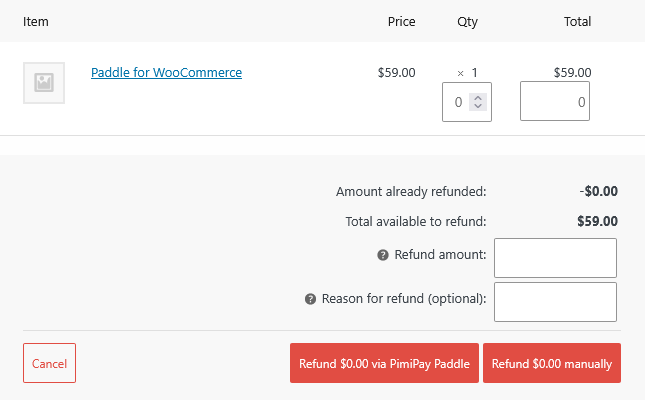
Refund in full or in part from the WooCommerce order screen. Refunds made in the Paddle dashboard are synced back to the order automatically.
Customer Billing Portal
A Manage Billing link in My Account takes customers straight into the Paddle portal for payment history, invoices and card updates — no second login.
Transaction Details on the Order
Paddle orders show transaction status, payment method, Paddle's fee and your earnings on the order screen, with a link to the invoice PDF.
Real-Time Webhooks
Automatic order status updates from Paddle. Payment confirmations, refunds, and cancellations handled instantly.
Tells You When It Breaks
Site Health checks catch the silent failures — a missing secret, webhooks that stopped verifying, a sync that stopped running. Browse recent deliveries from Paddle and replay any of them in one click.
Security First
HMAC SHA256 signature verification for webhooks. Server-side transaction validation before order completion.
Multi-Environment
Separate staging (sandbox) and production configurations. Test in sandbox before going live with easy switching.
Cart Recovery
Handle Paddle cart recovery email links. Customers can return to pending orders and complete payment seamlessly.
Automatic Updates
Receive updates automatically through WordPress admin. Stay secure and get new features as they are released.
Overlay or inline checkout
Customers complete payment without leaving your site. Paddle's hosted form opens as an overlay on top of your page, or renders inline, embedded in the page itself.
- Overlay modal by default — nothing to configure
- Or switch to inline and embed the payment form
- Works with the Cart & Checkout Blocks and classic checkout
- Customer details pre-filled, orders complete automatically
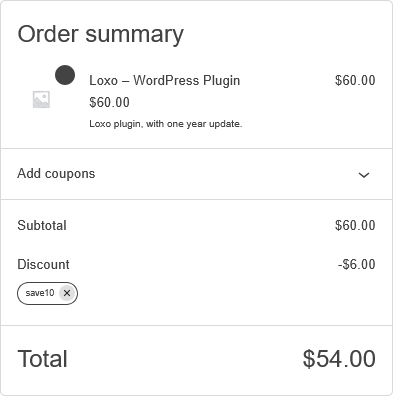
Charges what the order says
Turn on Order total pricing and Paddle bills the order's own lines, so a coupon applied in the cart is a coupon applied at checkout. Catalog price mode keeps charging the price synced to Paddle, exactly as before.
- Coupons, fees, shipping and dynamic prices billed as WooCommerce recorded them
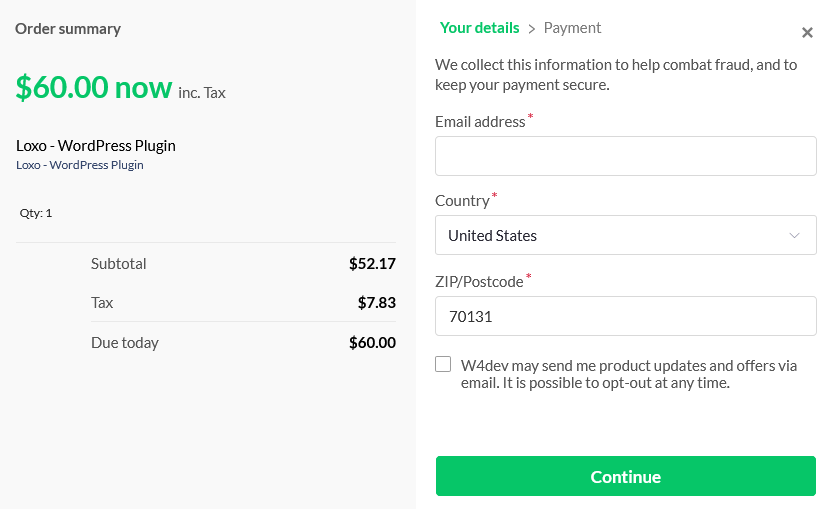
- The Paddle checkout opens showing the real total, not the catalog price
- Products still sync to Paddle — the synced price just no longer sets the charge
- Order notes flag an amount mismatch or an older draft that was paid instead
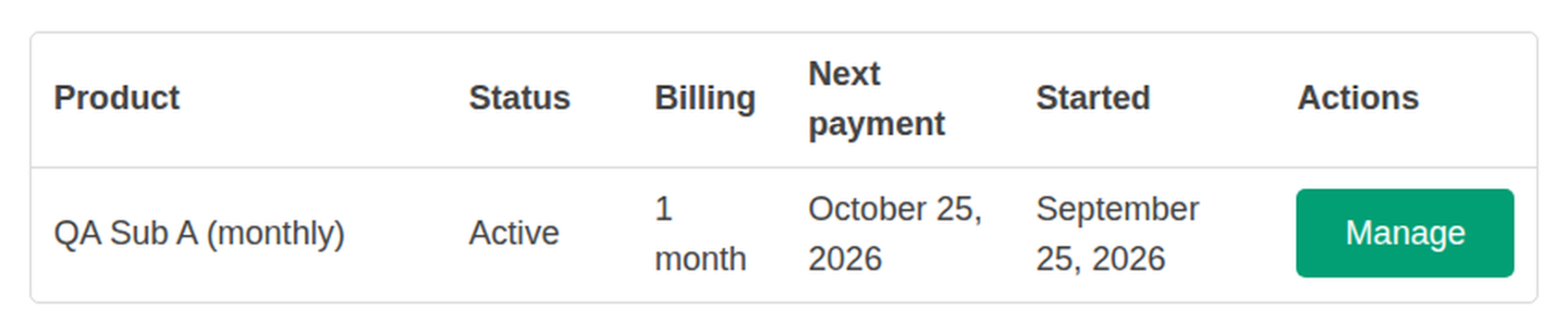
Recurring products, billed by Paddle
Set a simple virtual product to bill daily, weekly, monthly or yearly. Paddle creates the subscription at checkout and charges every renewal; WooCommerce records each one as an order linked to the first. Customers see their subscriptions in My Account and manage them in the Paddle portal.
- Recurring products, one-time products, or both in one cart
- Renewals become linked orders, so reports stay whole
- Downloads follow the subscription: revoked on cancel, restored on reactivation
- Off by default; switching it on adds a Billing option to simple virtual products
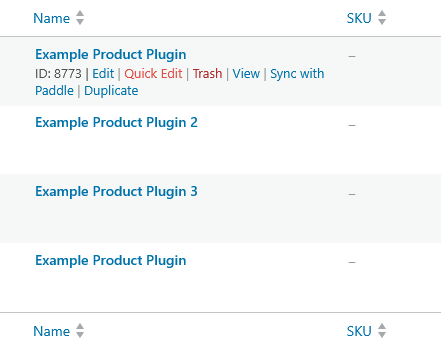
One-click product sync
Sync your WooCommerce products to Paddle with a single click. Simple and variable products are both supported, with each variation mapped to a Paddle price.
- Simple and variable product support
- Each variation synced as a separate Paddle price
- Paddle IDs stored as product meta for reference
- Bulk sync from the products list page
Refund from the order screen
Use WooCommerce's own refund button and the plugin sends it to Paddle as a refund adjustment. Refunds issued in the Paddle dashboard travel the other way and land on the order by themselves.
- Full and partial refunds from the WooCommerce order screen
- Paddle dashboard refunds sync back into WooCommerce
- Refunds Paddle reviews manually are tracked as awaiting approval
- The WooCommerce refund is recorded once Paddle approves it
Set up Paddle for WooCommerce in minutes
Install the WooCommerce Paddle plugin, connect your account, sync your products, and start accepting payments.
Paddle must approve your store's domain before it takes live payments. You can test everything in the sandbox while you wait.
Install & activate
Upload the plugin zip via WordPress Admin (Plugins → Add New → Upload) and activate it.
Enter your license key
Go to WooCommerce → PimiPay License and paste the key from your purchase email. This is what turns on automatic updates.
Connect Paddle
Add your Paddle Seller ID and API key for staging or production, then click Register Webhook. The plugin creates the webhook and its secret for you.
Sync products and take payments
Click "Sync with Paddle" on your Products page. Customers pay in Paddle's overlay or an inline form, and webhooks keep each order's status up to date.
Simple, transparent pricing
One plan with every feature included. Premium support and 1 year of updates.
Single Site
- • Every feature, on 1 site
- • 1 year of updates and email support
- • 30-day money-back guarantee Refund policy
- • Needs a Paddle Billing account (sandbox testing is free)
- • One-time and recurring payments for digital products — subscriptions are billed by Paddle, no extra extension. How subscriptions work
What happens next
- You pay on portal.w4dev.com, our own store. It takes the payment with this plugin, on WooCommerce and Paddle.
- Download the ZIP and copy your license key from your account there.
- Install it, enter the key under WooCommerce → PimiPay License, and connect Paddle. Install guide
Prices in USD, tax included. Renewal is optional and at the same rate. Nothing is charged automatically.
Technical requirements
Make sure your environment meets these before installing.
- PHP 8.3+
- WordPress 7.0.3+
- WooCommerce 4.0+
- Paddle Billing account
- SSL HTTPS required
Frequently asked questions
What is the Paddle for WooCommerce plugin? +
PimiPay is a WooCommerce Paddle plugin that integrates Paddle Billing with your store. It handles product synchronization, one-time and recurring checkout, refunds, real-time webhooks, and automatic order management — so you can accept payments worldwide with minimal setup.
Is PimiPay a WordPress plugin or a hosted service? +
It is a WordPress plugin that you install on your own site. Nothing is hosted for you and your store does not move anywhere: orders, customers and products stay in your own WordPress database, and Paddle is used only to take the payment and handle the tax. That is the difference between this and selling through a hosted storefront, where your catalogue and customer records live on someone else's platform.
Do I need a Paddle account to use PimiPay with WooCommerce? +
Yes, you need an active Paddle Billing account. You can sign up for free at paddle.com. The plugin works with both sandbox (staging) and production environments for easy testing before going live.
What are the system requirements for Paddle for WooCommerce? +
- PHP 8.3 or higher - WordPress 7.0.3 or higher - WooCommerce 4.0 or higher - An active Paddle Billing account - SSL certificate (HTTPS required for webhooks)
Does Paddle for WooCommerce work with HPOS (High-Performance Order Storage)? +
Yes. The plugin fully supports WooCommerce High-Performance Order Storage (HPOS), which is the modern order storage architecture. Your store is future-proof whether you use HPOS or the legacy post-based order storage.
Does Paddle for WooCommerce work with the WooCommerce Cart and Checkout blocks? +
Yes. The gateway is registered with the WooCommerce Cart & Checkout Blocks as well as the classic checkout, so Paddle appears as a payment method either way and payment completes on the order confirmation page in both flows. Availability is decided on the server, so the method disappears from the block checkout when the API is not configured or a cart item has not been synced to Paddle. Stores on a WooCommerce version without Blocks are unaffected.
Can I use Paddle alongside Stripe or PayPal in WooCommerce? +
Yes. PimiPay for Paddle registers as a standard WooCommerce payment gateway. Customers can choose between Paddle and any other active gateways (Stripe, PayPal, etc.) at checkout.
Does Paddle for WooCommerce support variable products? +
Yes. The plugin fully supports both simple and variable products. Each variation is synced as a separate price in Paddle, allowing customers to purchase any variation through the checkout modal.
Do WooCommerce coupons work with Paddle? +
Yes, since version 1.7.0. Set Pricing to Order total (WooCommerce → Settings → Payments → Paddle) and the plugin creates the Paddle transaction from the order's own lines, after WooCommerce has applied the coupon. Paddle then charges exactly the total the customer saw in the cart, and the Paddle checkout shows that figure when it opens. In the default Catalog price mode, Paddle charges the price synced to each product, so a WooCommerce coupon cannot be applied. Rather than overcharge, the plugin hides the Paddle payment method when the cart carries a coupon discount, and the customer is shown your other gateways instead. Paddle's own discount-code field is a separate thing: a code entered there reduces what Paddle charges without changing the WooCommerce order. If all your discounts are WooCommerce coupons, the Discount Codes setting hides that field so customers see one place to enter a code.
What is the difference between Catalog price and Order total pricing? +
They decide what Paddle charges, and you pick one in the Pricing setting. - Catalog price (the default) opens the checkout with the Paddle price synced from each product. It is how the plugin has always worked: the amount lives in Paddle, and WooCommerce coupons and fees do not reach it. A cart with a coupon discount or a negative fee hides the gateway rather than charging the wrong amount. - Order total creates the Paddle transaction from the WooCommerce order itself — its line items, fees and shipping lines — with fixed amounts. Whatever changed the total in WooCommerce is charged by Paddle as WooCommerce recorded it, and the Paddle checkout opens showing that real total. Products must be synced to Paddle in both modes, because each line references its Paddle product for reporting, but in Order total mode the synced price no longer matters. Tax follows your Paddle account setting in both modes: added on top for a tax-exclusive account, carved out for a tax-inclusive one. In Order total mode the transaction is prepared before the checkout opens and reused if the customer reloads the page. If the order changes, a fresh one is created; paying either still marks the order paid, and an order note records any amount mismatch. Order total is opt-in in 1.7.0, and a later release will make it the default.
Ready to add Paddle for WooCommerce?
Install the WooCommerce Paddle plugin and start accepting payments on your store today.
Buy Now